



Skip to content

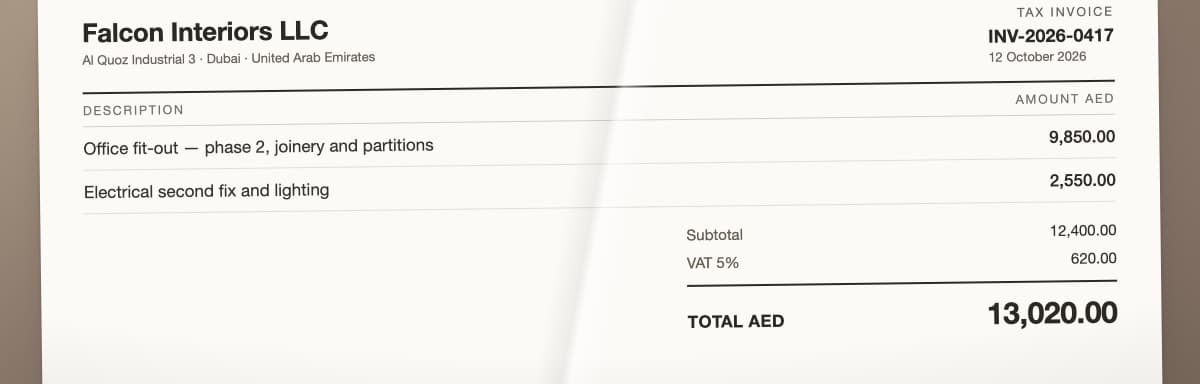
A UAE business owner’s paperwork arrives through every channel at once — receipts, supplier invoices, payment alerts and PDF statements — until none of it is posted and the VAT deadline is close. With PocketLedger it becomes one message: an invoice sent on WhatsApp is processed by PocketLedger AI as supplier Falcon Interiors, 13,020.00 dirhams, 5% VAT of 620.00 identified for review, with Office Expenses suggested as draft coding. The draft is shown as journal entry JE-2026-0512. An accountant confirms the coding, posts the reviewed entry and prepares the Q4 VAT return on 19 January 2027, nine days before it was due.

GOOD RECORDS.BETTER CONVERSATIONS.SAME TEAM. ALWAYS. ↗

Inside your client portal

Your books,
screen by screen.

Eight things you can check yourself, at any hour, without asking anyone for a copy. Each one is the actual screen.

Expenses

Every expense keeps
its VAT and category.

Supplier, date, amount, VAT and category stay attached to the recorded entry, with the original receipt one click away.

Explore bookkeeping ↗

Actual client portal · sample records

Your expenses

Actual client portal · fictional sample records

Actual client portal: your expenses, populated with fictional sample records.

Scroll to inspect the full image. Press Escape to close.

Invoices

What you're owed.
What's running late.

Issue and due dates, amount, outstanding balance and status for every invoice you send.

Explore invoicing ↗

Actual client portal · sample records

Your invoices

Actual client portal · fictional sample records

Actual client portal: your invoices, populated with fictional sample records.

Scroll to inspect the full image. Press Escape to close.

Documents

Everything on file.
Every expiry date too.

Trade licences, VAT certificates, bank statements and receipts, filed by type and watched for renewal dates.

See how documents are handled ↗

Actual client portal · sample records

Your documents

Actual client portal · fictional sample records

Actual client portal: your documents, populated with fictional sample records.

Scroll to inspect the full image. Press Escape to close.

Send it the way you already do. WhatsApp photos, emails and uploads land in one inbox.

See how records arrive ↗
Actual client portal, fictional sample records.

Your inbox

Actual client portal · fictional sample records

Actual client portal: your inbox, populated with fictional sample records.

Scroll to inspect the full image. Press Escape to close.

Where your month stands. What's in, what's booked, and the two numbers worth knowing today.

Follow the handoff ↗
Actual client portal, fictional sample records.

Your overview

Actual client portal · fictional sample records

Actual client portal: your overview, populated with fictional sample records.

Scroll to inspect the full image. Press Escape to close.

VAT, worked out as you go. Earlier quarters marked filed and paid.

VAT support ↗
Filed and paid
Actual client portal, fictional sample records.

Your VAT

Actual client portal · fictional sample records

Actual client portal: your vat, populated with fictional sample records.

Scroll to inspect the full image. Press Escape to close.

Corporate Tax, from the same books. No second set of numbers.

Corporate Tax support ↗
Actual client portal, fictional sample records.

Your Corporate Tax

Actual client portal · fictional sample records

Actual client portal: your corporate tax, populated with fictional sample records.

Scroll to inspect the full image. Press Escape to close.

Licence dates, read from the PDF. Not typed into a calendar.

How records are kept ↗
Actual client portal, fictional sample records.

Your licences

Actual client portal · fictional sample records

Actual client portal: your licences, populated with fictional sample records.

Scroll to inspect the full image. Press Escape to close.

Every card is the actual client portal, filled with fictional sample records. Select one to see the full screen.

Different businesses. Familiar paperwork.

  • Creative & consulting

    Big ideas. Small mountain of receipts.

  • Retail & online stores

    Orders in. Records in order.

  • Food & hospitality

    Full tables. Clearer books.

  • Trading & services

    Moving business. Keeping the context.

What we handle

You run the business.
We’ll handle the books.

Three jobs off your mental to-do list. One accounting team keeping the details connected.

01 / Monthly bookkeeping

A busy month.
A tidy set of books.

Every receipt, invoice and bank line posted and reconciled. Your client portal gives those numbers somewhere useful to live.

Explore bookkeeping ↗

See what earned its keepActual client portal · sample records

Understand what your business earned

Actual client portal · fictional sample records

Actual PocketLedger client portal: understand what your business earned, populated with fictional sample records.

Scroll to inspect the full image. Press Escape to close.

02 / VAT registration & returns

Keep the dates.
Lose the last-minute panic.

Registration support and return preparation from reconciled books. Submission responsibility agreed in writing.

What is coming upActual client portal · sample records

Your business, at a glance

Actual client portal · fictional sample records

Actual PocketLedger client portal: your business, at a glance, populated with fictional sample records.

Scroll to inspect the full image. Press Escape to close.

See VAT support ↗
03 / Corporate Tax

Start with the books.
Leave room for the details.

Registration support and ledger-based return preparation, with tax adjustments and responsibilities documented. The balance sheet is part of the underlying accounting picture.

Keep obligations in viewActual client portal · sample records

What your business owns and owes

Actual client portal · fictional sample records

Actual PocketLedger client portal: what your business owns and owes, populated with fictional sample records.

Scroll to inspect the full image. Press Escape to close.

See Corporate Tax support ↗

How it works

Your part is small.
That’s the point.

Send the record. Add the context. Your accountant takes it from there.

01 / You send

“Found it.”
Excellent. Send it over.

Files, dates and statusActual client portal · sample records

Your documents, with their status

Actual client portal · fictional sample records

Actual PocketLedger client portal: your documents, with their status, populated with fictional sample records.

Scroll to inspect the full image. Press Escape to close.

02 / We review

A person joins the dots.

Your accountant records the transactions, reconciles the bank and asks about anything that needs context.

03 / You stay in the picture

Less “any update?”
More actual updates.

Know where the work standsActual client portal · sample records

Your business, at a glance

Actual client portal · fictional sample records

Actual PocketLedger client portal: your business, at a glance, populated with fictional sample records.

Scroll to inspect the full image. Press Escape to close.

The portal reflects the work your team has reviewed. Sending a file is the beginning, not an instant completed return.

Follow the whole handoff ↗

One receipt, start to finish

One receipt. Four hands-off steps.

What happens between the photo you send and the number you read. Your part is the first step; an accountant does the rest.

  1. ReceivedFalcon Interiors · AED 13,020.00Photo arrives on WhatsApp
  2. ReadVAT 620.00 · Office ExpensesFields extracted, ready for review
  3. Asked“Is this the Al Quoz fit-out?”Your accountant checks the treatment
  4. PostedMatched to the bank line · RecordedIn your P&L and VAT position

Illustration · not a screenshot

The work behind your numbers

Somebody is doing this.
Here they are.

Your portal shows the result. This is the workspace your accounting team uses to get there.

Practice checklists

The month runs on
a checklist, not a memory.

Licence renewals, VAT returns and the monthly close each carry a due date and visible progress.

Actual accounting workspace · sample records

Accounting workspace · work

Actual accounting workspace · fictional sample records

Actual accounting workspace: accounting workspace · work, populated with fictional sample records.

Scroll to inspect the full image. Press Escape to close.

See how the work is run ↗
Review queue

Every document is reviewed
before it counts.

Parsing and verification are checked by an accountant — the step between a photo and a posted entry.

Actual accounting workspace · sample records

Accounting workspace · documents

Actual accounting workspace · fictional sample records

Actual accounting workspace: accounting workspace · documents, populated with fictional sample records.

Scroll to inspect the full image. Press Escape to close.

Follow the handoff ↗

Your client portal / connected to the work

Complex books.
Clearer answers.

The accounting happens behind the scenes. The evidence, progress and results are right here.

01 / RECORDS WITH CONTEXT

The receipt has entered the conversation.

An expense is more than a number. Follow the supplier, VAT, category and reference back to its source. Memory can take the afternoon off.

  • Evidence stays attached

    Open the original receipt from the expense record.

  • Treatment stays visible

    See the category and VAT alongside the recorded amount.

  • Your accountant handles the ledger

    Double-entry posting and reconciliation happen behind your client view.

Explore records and expenses ↗
POCKETLEDGER / CLIENT VIEW
The evidence behind an expenseActual client portal · sample records

From expense to source receipt

Actual client portal · fictional sample records

Actual PocketLedger client portal: from expense to source receipt, populated with fictional sample records.

Scroll to inspect the full image. Press Escape to close.

KEEP THE RECEIPTS. KEEP THE CONTEXT.

02 / ACCOUNTING, WITH ACCOUNTABILITY

The numbers should add up. The story should too.

Your accounting team works through the records and follows up on what needs context. Your portal gives you somewhere to check where things stand.

  • Statements meet the books

    Reconciliation brings bank lines and accounting entries together.

  • Questions have a purpose

    Unresolved differences go back for clarification before the work moves on.

  • Review has a visible result

    Check the review status and the date your books are up to.

See how the handoff works ↗
POCKETLEDGER / THE HUMAN PARTA professional holding a notebook.
THE QUESTION BEHIND THE WORK

“What was this payment for?”

A useful question. Ideally asked once.
Know where the work standsActual client portal · sample records

Your business, at a glance

Actual client portal · fictional sample records

Actual PocketLedger client portal: your business, at a glance, populated with fictional sample records.

Scroll to inspect the full image. Press Escape to close.

SAME TEAM. ALWAYS.

03 / PERFORMANCE, EXPLAINED

Busy month. But was it a good one?

Income tells part of the story. Expenses and net profit finish the sentence. Read the accounts for your chosen period, without spreadsheet archaeology.

  • Choose the period

    Review a quarter or a date range in your profit and loss report.

  • Look beneath the total

    Income and expense categories explain what contributed to the result.

  • Keep the bigger picture

    Pair performance with your balance sheet, then download the reports as PDFs.

Explore financial reports ↗
POCKETLEDGER / CLIENT VIEW
See what earned its keepActual client portal · sample records

Understand what your business earned

Actual client portal · fictional sample records

Actual PocketLedger client portal: understand what your business earned, populated with fictional sample records.

Scroll to inspect the full image. Press Escape to close.

↓ THE COSTS BEHIND THE RESULT
Follow the spendingActual client portal · sample records

Understand what your business earned

Actual client portal · fictional sample records

Actual PocketLedger client portal: understand what your business earned, populated with fictional sample records.

Scroll to inspect the full image. Press Escape to close.

LESS GUESSWORK. MORE WORKING PAPERS.

04 / TAX, IN CONTEXT

A deadline with a plan. How refreshing.

Your current VAT position sits alongside the upcoming obligation. Amount, preparation status and due date: three things worth knowing before the calendar gets dramatic.

  • Know the period

    See which tax period the current estimate belongs to.

  • Follow preparation

    Check the upcoming obligation’s amount, status and due date.

  • Keep responsibility clear

    Your written scope confirms the agreed preparation and submission process.

Explore VAT support ↗
POCKETLEDGER / CLIENT VIEW
Your VAT position, explainedActual client portal · sample records

Your VAT position and next deadline

Actual client portal · fictional sample records

Actual PocketLedger client portal: your vat position and next deadline, populated with fictional sample records.

Scroll to inspect the full image. Press Escape to close.

↓ NEXT: THE UPCOMING OBLIGATION
What is coming upActual client portal · sample records

Your business, at a glance

Actual client portal · fictional sample records

Actual PocketLedger client portal: your business, at a glance, populated with fictional sample records.

Scroll to inspect the full image. Press Escape to close.

CALENDAR DRAMA: OPTIONAL.

Same team. Clearer picture.

Numbers you can see.
A person you can ask.

The portal shows what’s happening in your books. Your accounting contact helps you understand it. Bring the question—even if it starts with “this might be obvious.”

See how we work together

Three professionals standing together in navy, ivory and emerald clothing.
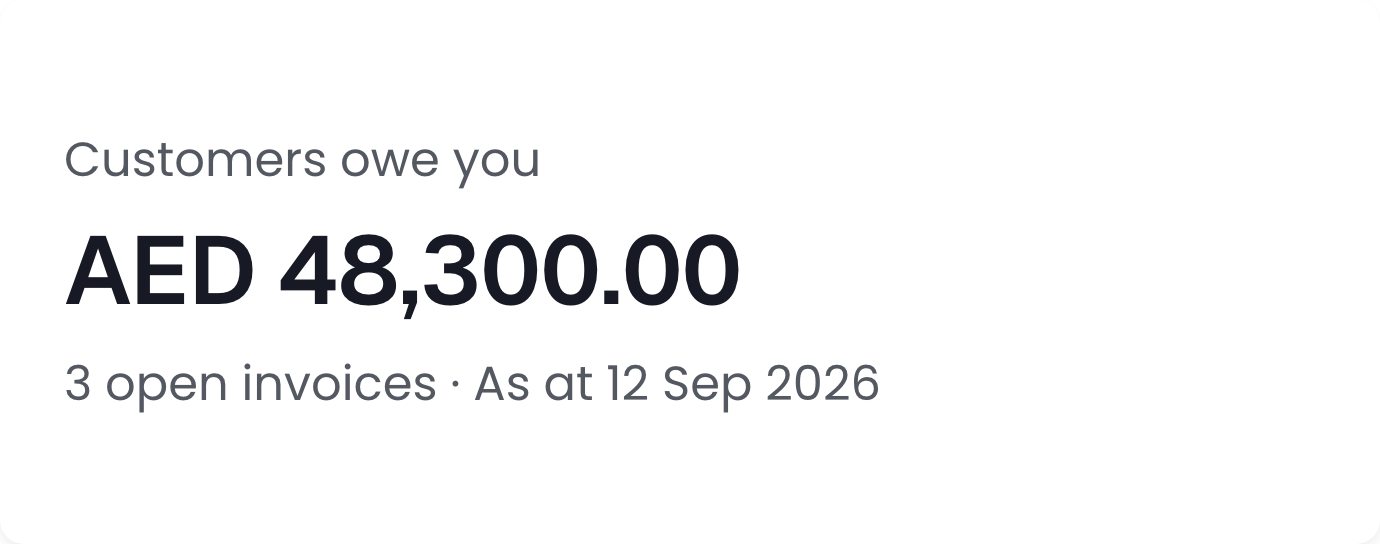
Actual client portal card: customers owe AED 48,300 across three open invoices. Fictional sample records.
Actual client portal · fictional sample records

Behind your client portal

The books don’t
do themselves.
We checked.

PocketLedger also gives your accounting team a workspace for the work behind the numbers. Your client portal shows the result: expenses with categories, VAT and recorded status, ready for a more useful conversation.

  1. Records come in. Documents, invoices and expenses give the work its context.
  2. Your team works through them. Each expense keeps its supplier, category and recorded status.
  3. You get a clearer view. Open your client portal to review the available records and reports.
See the whole handoff
SAME SYSTEM.
DIFFERENT JOBS.
The details behind the spendActual client portal · sample records

See where the business spends

Actual client portal · fictional sample records

Actual PocketLedger client portal: see where the business spends, populated with fictional sample records.

Scroll to inspect the full image. Press Escape to close.

We handle the accounting workspace. You use the client portal. Nobody needs a second career in journal entries.

Built around UAE business

Your paperwork.
With a local accent.

AED reporting, tax periods and business documents belong in the same conversation.

Files, dates and statusActual client portal · sample records

Your documents, with their status

Actual client portal · fictional sample records

Actual PocketLedger client portal: your documents, with their status, populated with fictional sample records.

Scroll to inspect the full image. Press Escape to close.

01 Dates worth remembering
VAT and Corporate Tax deadlines in your agreed scope. Your team prepares working papers from reconciled books.
02 Documents worth keeping
Trade licences, VAT certificates and Emirates IDs organised by type, with expiry dates for renewal reminders.
03 One reporting language: AED
Foreign-currency records retain their source currency and exchange-rate context. Your ledger reports in AED.

How your work is protected

Trust should come with details.

You should know who reviews the work, what they are responsible for, and how the underlying records are protected.


An accountant remains accountable

Our accounting team reviews posting, reconciliation, and return preparation. Before work starts, your engagement sets out what we handle and where your responsibility begins.

The scope understands the UAE

VAT, Corporate Tax, and UAE business records are handled in the same accounting context. Who submits each return is confirmed in your written engagement before work begins.

Your records stay under your control

Traffic is encrypted in transit, your business records are isolated from other organisations, and sensitive changes remain traceable. Your records remain yours to export.

Good questions to ask before you start

What exactly is included?

Your written engagement sets out the recurring work, deliverables, price and responsibilities. Historical catch-up and one-off work are scoped separately.

Read the service scopes ↗
What will you need from me?

Source documents such as receipts, invoices and bank statements, plus the business context behind them. The team may ask you to clarify an item before it can be finalised.

See the document handoff ↗
Who handles the final submission?

Return preparation and submission responsibility are confirmed in your written engagement. Agree who reviews, approves and submits before work starts.

Check the scope and boundaries ↗

Simple pricing

Know the number. Know what’s included.

A little clarity before we begin

Find your monthly rhythm.

WRITTEN SCOPE. CLEAR NEXT STEP.
Estimate your monthly transaction volume
0More than 200
StarterUp to 50 transactions / monthAED 899/mo

Same care. A different volume.The band follows the work. We confirm your records, scope and price before getting started.

Your estimate

Starter

AED 899 /mo

Up to 50 transactions / month

BillingMonthlybefore VAT, if applicable
  • Monthly bookkeeping & reconciliation
  • VAT return preparation for the agreed submission process
  • Corporate Tax return preparation for the agreed submission process
  • Human review by the accounting team
  • Your dashboard — P&L, VAT position, documents for processed periods
Get my written quote (opens in a new tab)